

How to use our CSV/XML files to keep your stock up to date
When your customers shop with you online, they expect to see the latest stock available to buy on your website. Or, if an item or size is unavailable, they want to know before they begin browsing styles, choosing sizes and weighing up options. The lack of clear stock information, can lead to frustrated and disappointed customers. It is therefore crucial that your stock on your website is kept up to date to maximise sales and customer satisfaction.
Naturally, you might be worried about how you’re going to keep on top of the stock information on your website. After all, if you’re one of our successful lingerie drop shipping clients, you have access to over 3,000 unique products, and will be receiving many orders and multiple website visits. As part of our commitment to help you to succeed, we’ve created CSV and XML feeds that help you to keep your website stock levels up to date.
How does it work?
When you’re using our warehouse as your own, you need to rely on us for the latest stock information. So we’ve enabled the use of our stock files to allow you to set up your website to read these files and automated stock updates can be set up on your own system.
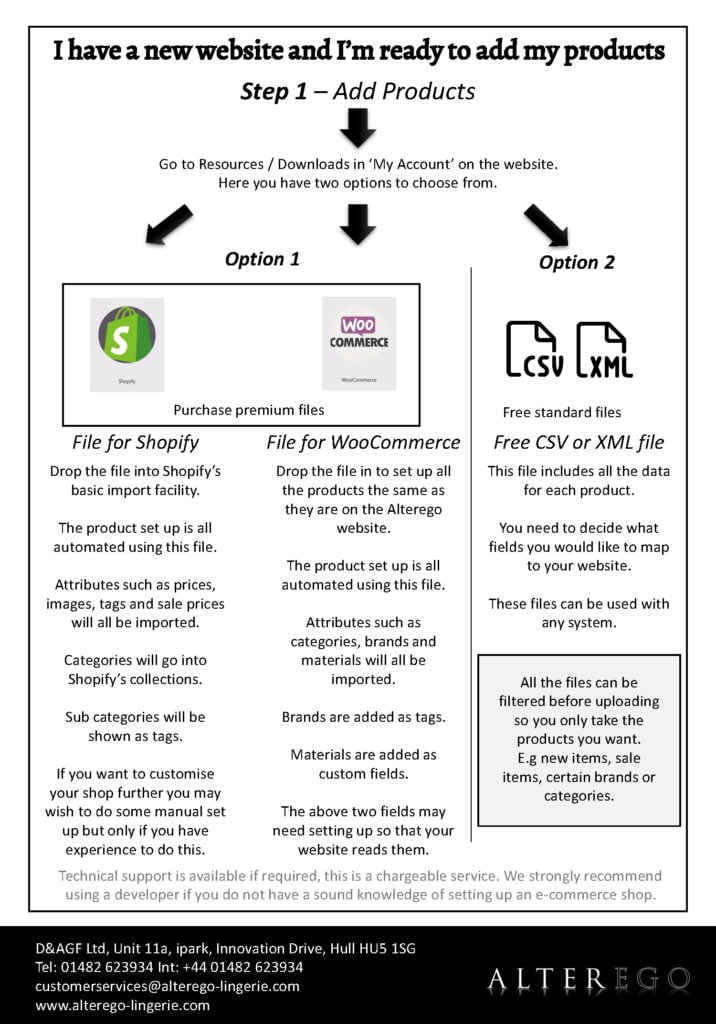
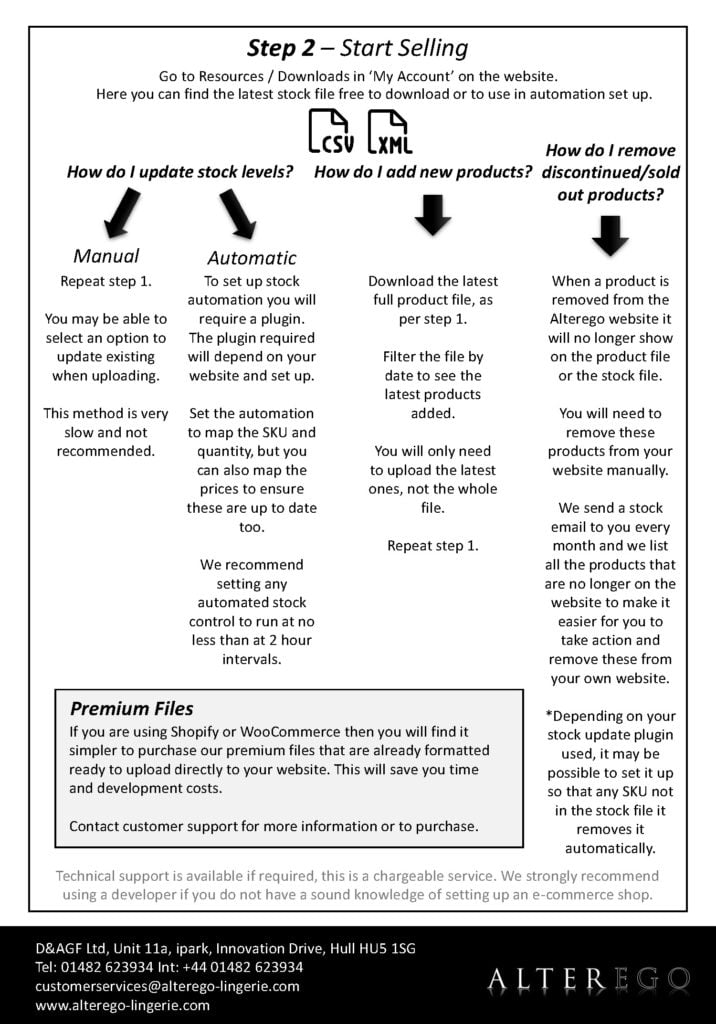
The files are available once you create an Alterego account. From there, you’ll find the files in your downloads section. Navigate to this, then find the files in CSV and XML format. (Please note you do not need to purchase the premium file to access the stock file. Purchasing premium files does not automate your stock for you.) Right click on the file of your choice, then copy the link which can be used to directly link from your own website to the file. Set up stock management on your website, then the stock levels, containing each individual SKU and its quantity, will be updated every hour, matching the live stock data from our warehouse. More details can be found in this document here.
How can I find some help?
For some customers, the processes of setting up stock management systems and uploading files can be complicated. You may need the assistance of a professional website developer if you are not confident with setting up your online store.
Take a look at the Resources section of our website. Here, you’ll find step-by-step guides to uploading products and corresponding stock levels. Our blog is also a great source of support, with posts explaining everything from what a CSV file is to how it benefits you.
Of course, if you’re still struggling, we’re here to help. Get in touch with our team, who are on hand to answer any questions and provide support.
What else do I need to do?
The files should be checked on a regular basis to keep your own shop up to date. It’s up to you to make sure the automatic uploads are happening or that the manual updates have been completed. It’s also important to remove any discontinued products that are no longer available. You can find these from our monthly stock update emails.
Take a look at the range of more than 3,000 unique products on the website and stay up to date with the latest lingerie drop shipping information.
We look forward to supporting your lingerie drop shipping business to success in 2022.